
I Tested the Best Toyota Techstream for Android: My Ultimate Guide to Car Diagnostics!

Toyota Techstream provides detailed access to a vehicle’s onboard systems, but there is an important distinction for Android users: Techstream is Windows-based diagnostic software, not a native Android app. An Android phone can handle many useful diagnostic tasks through a compatible OBD-II adapter and a separate diagnostic app, but that setup does not automatically provide Techstream’s functions.
This guide covers the Techstream cables and Android-related Toyota accessories below, explains what each type of product does, and helps you choose between mobile diagnostics and a Windows-based Techstream setup. For basic fault-code checks and live engine data, Android may meet your needs. For Toyota-specific diagnostics, customization and supported service procedures, you need to check the software, interface and vehicle coverage more carefully.
Toyota Techstream Cables and Android Accessories Compared

Mini Vci J2534 TIS OBD2 Techstream with Latest Software V18.00.008 Diagnostic Cable for Toyota

Wireless Carplay/Android Auto Adapter for Toyota with Entune2.0 & Touch2 2014-2019 New Version Retrofit Kit Decoder Fits for Tundra/Highlander/RAV4/Tacoma/Camry/Corolla/Avalon/Prius/CH-R/Sienna/Camry

lydesor Mini Vci J2534 Cable for Toyota Techstream-Latest Version V18.00.008,OBD2 to USB Diagnostic and Reprogramming Cable Fits Toyota Lexus Scion Vehicles,Work with Windows XP Win7 Win10(32/64bit)

Mini-VCI J2534 Cable Firmware 1.4.1 for Toyota Techstream, Toyota Tis Cable,Techstream Software
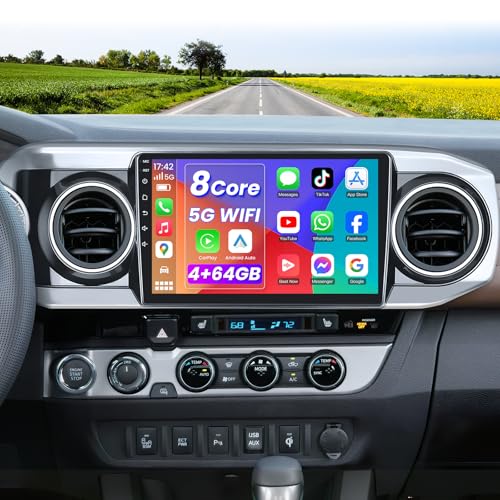
[8core+ 64GB ROM] Car Radio for Toyota Tacoma 2016-2021, 10 Inch 1280 * 800 Touch Screen Android 13 Head Unit, Car Stereo with Wireless CarPlay & Android Auto Bluetooth WiFi GPS FM
1. Mini Vci J2534 TIS OBD2 Techstream with Latest Software V18.00.008 Diagnostic Cable for Toyota
This Mini VCI J2534 cable is intended for a computer-based Toyota diagnostic setup. The product specifies software version V18.00.008. Check the required Windows version, driver and software license before buying; a USB connection alone does not make it compatible with Android.
For routine troubleshooting, a compatible interface and Techstream installation can help you read fault codes and inspect live vehicle data. Save the codes and associated information before clearing anything so you have a record for further diagnosis.
This type of cable suits owners who want to investigate Toyota-specific systems from a laptop. Confirm support for your model year and the particular control modules you need to access. Reading a fault code is the start of diagnosis, not proof that a named component needs replacing.
Get It From Amazon Now: Check Price on Amazon & FREE Returns
2. Wireless Carplay/Android Auto Adapter for Toyota with Entune2.0 & Touch2 2014-2019 New Version Retrofit Kit Decoder Fits for Tundra/Highlander/RAV4/Tacoma/Camry/Corolla/Avalon/Prius/CH-R/Sienna/Camry
This retrofit kit is for wireless phone integration with compatible Toyota Entune2.0 and Touch2 systems. It serves a different purpose from Techstream: it brings supported phone functions, such as navigation and calls, to the vehicle display rather than reading diagnostic codes.
For a 2017 RAV4 or 2016 Highlander, check the existing display, connectors and factory system before ordering. The advertised 2014-2019 range is a starting point, but the vehicle’s installed equipment determines whether a retrofit kit will fit and work correctly.
The same checks apply to a 2015 Tacoma and the other listed Toyota models. Wireless integration can reduce the need to connect a phone cable for supported navigation and calling functions. Review the installation instructions first, including any dashboard removal and wiring connections required.
Get It From Amazon Now: Check Price on Amazon & FREE Returns
3. lydesor Mini Vci J2534 Cable for Toyota Techstream-Latest Version V18.00.008,OBD2 to USB Diagnostic and Reprogramming Cable Fits Toyota Lexus Scion Vehicles,Work with Windows XP Win7 Win10(32/64bit)
The lydesor Mini VCI J2534 cable specifies V18.00.008 software and lists Windows XP, Windows 7 and Windows 10 compatibility. Its OBD2-to-USB connection is intended to link a supported vehicle to a computer, not to turn Techstream into an Android application.
The product lists Toyota, Lexus and Scion vehicles, along with 32-bit and 64-bit Windows support. Match the interface driver to your operating system and confirm that the Techstream release supports the vehicle and functions you need.
Diagnostic access and ECU reprogramming have different requirements. Before attempting a programming procedure, confirm that the interface is suitable for that exact operation, obtain the correct software and calibration, and follow Toyota’s service instructions. Programming requires a stable connection and an appropriate vehicle power supply.
Get It From Amazon Now: Check Price on Amazon & FREE Returns
4. Mini-VCI J2534 Cable Firmware 1.4.1 for Toyota Techstream, Toyota Tis Cable,Techstream Software
This Mini-VCI cable identifies its firmware as version 1.4.1. Firmware is the software inside the interface, and it is separate from the Techstream version installed on your computer. Both matter when checking compatibility.
With a compatible setup, reading and clearing diagnostic codes can make routine troubleshooting more convenient. Record the codes and freeze-frame data first. Clearing codes does not repair the underlying fault and may reset emissions readiness monitors.
Check driver installation instructions, supported vehicle protocols and the exact functions you intend to use. A cable that reads engine data successfully is not automatically suitable for every control module or programming task.
Get It From Amazon Now: Check Price on Amazon & FREE Returns
5. [8core+ 64GB ROM] Car Radio for Toyota Tacoma 2016-2021, 10 Inch 1280 * 800 Touch Screen Android 13 Head Unit, Car Stereo with Wireless CarPlay & Android Auto Bluetooth WiFi GPS FM
This Toyota Tacoma head unit lists an eight-core processor, 64GB storage, Android 13 and a 10-inch 1280 × 800 touchscreen. It targets 2016-2021 vehicles and includes wireless CarPlay and Android Auto. These features concern the dashboard interface and phone connectivity, not native Techstream support.
Navigation through applications such as Google Maps can be a useful reason to upgrade a dashboard display. Check GPS operation, network requirements and rear-view camera compatibility before installation. Camera image quality depends on the camera, wiring and display setup, so test the complete system while parked.
Steering wheel controls and split-screen operation are useful features to check for your particular installation. Confirm whether additional adapters are needed to retain factory controls and the existing camera. An Android head unit may run compatible diagnostic apps, but those apps still need a supported OBD-II interface and do not become Techstream simply because the display runs Android.
Get It From Amazon Now: Check Price on Amazon & FREE Returns
Why the Right Toyota Diagnostic Setup Matters
Access to diagnostic information makes it easier to understand a warning light, record symptoms and discuss a repair with a technician. An Android device with a compatible OBD-II adapter and app can read supported engine fault codes and display real-time data without a dedicated laptop. That convenience is useful for routine checks, but basic OBD-II coverage is not the same as access to every Toyota system.
Techstream offers Toyota-specific diagnostic and service functions on supported vehicles through a compatible Windows setup. Depending on the vehicle and access requirements, these can include service procedures, customization and key registration. Do not assume that a generic Android app or a low-cost interface supports all of these tasks. Key-related procedures may require authorized security access, and ECU programming needs the correct equipment and service information.
A clear interface helps you find fault codes and understand sensor readings, but good diagnosis still depends on interpreting the results. Start with a saved scan, inspect the relevant system and follow the applicable repair procedure. This approach can help you handle straightforward maintenance and recognize jobs that need professional equipment or experience.
My Buying Guide on Best Toyota Techstream For Android
My starting point is the job the tool needs to do. For mobile engine-code checks, I would choose an Android-compatible OBD-II adapter and diagnostic app. For Techstream itself, I would build a compatible Windows-based setup. The cables above belong to that second category, while the phone-integration adapter and Tacoma head unit are dashboard accessories rather than diagnostic interfaces.
Understanding Toyota Techstream
Toyota Techstream is diagnostic software used to communicate with supported Toyota and Lexus vehicle systems. Coverage can include engine, transmission, braking and other control modules, depending on the vehicle, software release and interface. It provides access to fault codes, live data and supported service functions.
The vehicle interface connects the computer to the diagnostic port. The software, interface driver and vehicle coverage must work together. A product name that includes “J2534” or “Techstream” does not by itself establish support for every diagnostic or programming operation.
Compatibility with Android Devices
Techstream does not run natively on Android. Connecting a Mini VCI USB cable to a phone with an adapter does not supply the Windows drivers and software environment it requires. For a straightforward Android setup, choose a diagnostic app and an OBD-II adapter that explicitly support each other.
Check your Android version, the adapter’s Bluetooth, WiFi or USB requirements, and the app’s coverage for your Toyota model year. Generic OBD-II support usually focuses on emissions-related engine information. Access to systems such as ABS, airbags and hybrid controls requires explicit vehicle-specific support.
Android Auto is separate from Android diagnostic software. A wireless Android Auto adapter does not function as an OBD-II scanner, and a dashboard screen does not add vehicle diagnostic coverage on its own.
Features to Look For
These are the features I would compare before choosing a diagnostic setup:
- Live Data Streaming: Look for real-time readings from supported sensors. Graphing and recording can help you compare values and review intermittent symptoms. Record data safely rather than watching the screen while driving.
- DTC (Diagnostic Trouble Codes) Reading: Choose software that reads the codes you need and saves a report. Freeze-frame data is useful for understanding the conditions present when a fault was detected. Clear codes only after recording the information and addressing the fault.
- Programming and Reprogramming: If you need key registration or ECU reprogramming, confirm support for the exact vehicle and procedure. These are advanced functions, not standard features of a basic Android OBD-II app. Check authorization, interface and power-supply requirements before proceeding.
- User-Friendly Interface: Clear menus, readable units and straightforward reports make the tool easier to use. Good explanations and access to service information help you interpret the data rather than simply collect it.
Price Range
Set a budget for the complete setup rather than the cable alone. An Android option may involve an adapter, an app purchase and paid vehicle-specific coverage. A Techstream setup may require a compatible Windows computer, an interface, licensed software access and any equipment needed for the intended procedure.
More advanced functions generally cost more. An affordable tool can be enough for basic engine-code checks, while module-level diagnostics and programming call for closer attention to coverage and support. Compare the features you will actually use instead of choosing solely by the lowest purchase price.
Reading Reviews and Recommendations
Look for reviews from owners with the same model year, engine and diagnostic goal. A report that an adapter connects successfully is less useful than a description of which modules it can access and which functions work.
Toyota owner forums and detailed product reviews can help identify driver-installation difficulties, connection problems and gaps in coverage. For dashboard accessories, check installation details and retention of factory features separately from diagnostic compatibility.
Support and Updates
Choose a supplier that provides clear installation instructions, suitable drivers and practical troubleshooting help. Software updates may add vehicle coverage or fix communication problems, but older interfaces can still limit what a setup supports.
Check software licensing and update costs before buying. Use legitimate software and match the Techstream release to its operating-system and interface requirements. For an Android app, confirm that updates continue to support your phone and adapter.
Final Thoughts
The best choice depends on whether you need Android convenience or Techstream-specific functions. For basic mobile diagnostics, select a supported Android app and OBD-II adapter with clear Toyota coverage. For Techstream, choose a compatible Windows computer and interface, then confirm the functions available for your vehicle.
Keep dashboard upgrades separate from diagnostic purchases. Wireless phone integration and a larger navigation display can improve everyday use, but they do not replace a scan tool. Focusing on compatibility, useful features, total cost and dependable support will help you buy equipment that fits your maintenance needs.
Author Profile
-
With more than 30 years in the bicycle industry, I have a strong background in bicycle retailing, sales, marketing and customer service. I have a passion for cycling and a dedication to excellence. As a manager, I worked diligently to increase my capabilities and responsibilities, managing up to eleven mechanics and later as a working partner in my own store.
I am adept at managing owned and loan inventory, preparing weekly & annual inventory statements, and managing staff. The role as managing partner also allowed me tremendous freedom. I used this personal freedom to become more deeply involved in my own advancement as a mechanic, to spearhead local trail building, and advocating for cycling both locally and regionally.
As a mechanic, I have several years doing neutral support, experience as a team mechanic, and experience supporting local rides, races, club events. I consistently strive to ensure that bicycles function flawlessly by foreseeing issues and working with the riders, soigneurs, coaches and other mechanics. Even with decades of experience as a shop mechanic and team mechanic, and continue to pursue greater involvement in this sport as a US Pro Mechanic, and UCI Pro Mechanic.
Latest entries
- September 26, 2025Troubleshooting2011 BMW 328i Fluid Leak Near Rear Driver-Side Tire
- September 26, 2025TroubleshootingHow to Know If You Have a Blown Ignition Fuse
- September 26, 2025TroubleshootingHow to Turn Off Your Car’s Turn Signal
- September 26, 2025TroubleshootingWhy Does My Car Sound Like a Machine Gun When Accelerating?